Imagine this: You live in a city like Houston or Detroit. Your monthly income is $2,500. Rent takes $1,200. Groceries cost $400. Utilities, gas, school expenses… and suddenly, you’re left with almost nothing.
By the end of the month, you’re:
- Using credit cards for basic needs
- Missing bill payments
- Living paycheck to paycheck
This is the reality for millions of low-income families in the US.
The good news? You don’t need a financial advisor or expensive tools. A simple budgeting app can help you:
- Track every dollar
- Avoid unnecessary spending
- Save even on a tight income
In this guide, I’ll explain the best budgeting apps (free & low-cost) and show you exactly how to use them step-by-step.
📱 Why Budgeting Apps Are Important for Low-Income Families
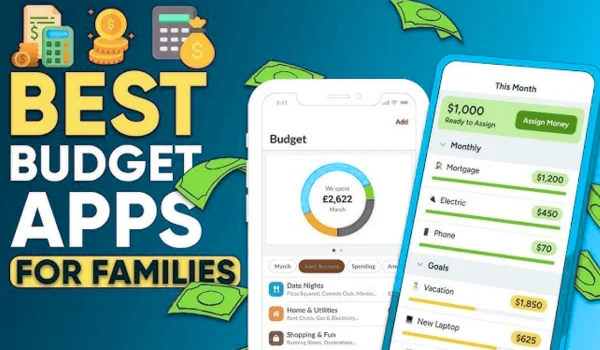
Budgeting apps are powerful because they:
- Automatically track your spending
- Show where your money is going
- Help you plan bills and savings
Some apps even:
- Detect subscriptions
- Alert you before bills
- Help reduce unnecessary expenses
🏆 Best Budgeting Apps for Low-Income Families (USA)
Here are the most practical and beginner-friendly apps:
- Mint (Best Free Overall)
Why it’s great:
- 100% free
- Tracks bank accounts, credit cards
- Shows spending categories
Best for: Beginners who want a simple, free solution
💡 Example: A family in Chicago can easily see how much they spend on groceries vs rent
- PocketGuard (Best for Overspending Control)
Why it’s great:
- Shows “money left to spend”
- Helps avoid overspending
- Simple interface
Best for: Families who struggle to control daily spending
- YNAB (You Need A Budget) (Best for Discipline)
Why it’s great:
- Uses zero-based budgeting (every dollar has a job)
- Strong financial habits
Downside: Paid (~$100/year)
Best for: Serious users who want full control
- EveryDollar (Best for Simple Planning)
Why it’s great:
- Easy zero-based budgeting
- Free version available
- Good for beginners
- Goodbudget (Best for Cash Budgeting)
Why it’s great:
- Envelope system (rent, food, bills)
- Great for families
Best for: People who prefer cash-style budgeting
- Quicken Simplifi (Best for Families)
Why it’s great:
- Tracks household expenses
- Shareable with spouse
- Smart insights
📊 Comparison Table (Important for Choosing)
| Feature | Mint | PocketGuard | YNAB | EveryDollar | Goodbudget | Simplifi |
| Cost | Free | Free + Paid | Paid | Free + Paid | Free + Paid | ~$3/month |
| Best For | Beginners | Overspending | Discipline | Simple budgets | Cash method | Families |
| Bank Sync | Yes | Yes | Yes | Paid only | No (manual) | Yes |
| Ease of Use | Very Easy | Easy | Medium | Easy | Easy | Easy |
| Family Use | Limited | Limited | Yes | Yes | Yes | Yes |
🧠 Step-by-Step: How to Use a Budgeting App (Beginner Guide)
Step 1: Choose the Right App
- If you want free → Mint
- If you overspend → PocketGuard
- If you want strict control → YNAB
Step 2: Connect Your Accounts
- Link bank account
- Add credit cards
- Include bills
Step 3: Track Monthly Income
Example:
- Salary: $2,500
- Side income: $300
Step 4: Categorize Expenses
- Rent: $1,200
- Groceries: $400
- Utilities: $200
- Transport: $150
Step 5: Set Limits
- Food budget: $350
- Entertainment: $50
Step 6: Monitor Weekly
Check app every 2–3 days.
💡 Smart Budgeting Tips (For Low-Income Families)
- Follow the 50/30/20 Rule
- 50% needs
- 30% wants
- 20% savings
- Use “Zero-Based Budgeting”
Assign every dollar a job (popular in apps like EveryDollar & YNAB)
- Track Small Expenses
Coffee, snacks = big monthly loss
- Cut Subscriptions
Apps like Albert can detect subscriptions
- Build Emergency Fund
Even $10/week helps
⚠️ Common Mistakes to Avoid
❌ 1. Not Checking the App Regularly
Budgeting fails if ignored
❌ 2. Setting Unrealistic Budgets
Don’t cut food too much
❌ 3. Ignoring Small Expenses
$5/day = $150/month
❌ 4. Using Too Many Apps
Stick to ONE app
❌ 5. Giving Up Too Early
Most people quit in 1 month
📈 Real-Life Example
Family in Atlanta:
- Income: $3,000
- Before budgeting: No savings
- After using PocketGuard:
- Saved $200/month
- Reduced eating out
- Paid off credit card
❓ FAQs
- Are budgeting apps safe in the US?
Yes, most use bank-level encryption and are secure.
- Which app is completely free?
Mint is one of the best fully free apps.
- Can I use these apps without a bank account?
Yes, apps like Goodbudget allow manual entry.
- What if my income is irregular?
Use flexible apps like YNAB or EveryDollar.
- Do budgeting apps really help save money?
Yes—tracking spending alone can reduce expenses significantly.
✅ Final Conclusion: What You Should Do Next
If you’re struggling with money, don’t wait.
👉 Start today with ONE simple step:
- Download Mint (free) or PocketGuard
- Add your income and expenses
- Track spending for 7 days
- Cut at least 1 unnecessary expense
You don’t need a high income to improve your finances.
👉 You just need control over your money.
Start small. Stay consistent. And within 30–60 days, you’ll see real change.
About the Author